
Introduction
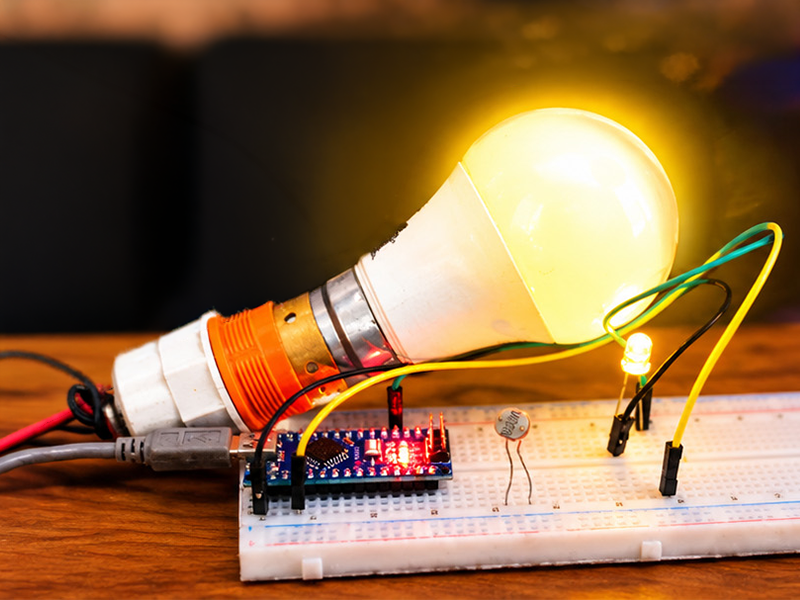
This project demonstrates how to build an Arduino-based Automatic Night Light that turns on automatically when ambient light levels drop below a certain threshold. It is a beginner-friendly DIY electronics project that introduces basic microcontroller programming, sensor interfacing, and output control.
Connections
Here is how the components are wired together for the circuit:
- Photoresistor (LDR / Light Sensor):
- One leg connects to GND on the Arduino.
- The other leg connects to Analog Pin A0 on the Arduino.
- LED / Output Indicator:
- The positive (longer/anode) leg of the LED connects to Digital Pin 13 on the Arduino.
- The negative (shorter/cathode) leg connects to GND.
- Relay : Connect GND of Arduino to GND of Relay Module.Vcc of Relay to 5V pin of Arduino . Relay Signal pin to D13.
Working Principle
- Sensing Light Levels: The Light Dependent Resistor (LDR) changes its resistance based on the intensity of ambient light. In bright conditions, its resistance is low; in dark conditions, its resistance increases significantly.
- Analog-to-Digital Conversion: The Arduino reads the analog voltage across the LDR circuit through its analog input pin (
A0), converting the varying voltage into a digital value ranging from 0 to 1023. - Threshold Detection: The onboard microcontroller program continuously evaluates this sensor reading against a predefined threshold value.
- Actuating the Output: When the ambient light falls below the set threshold (indicating nighttime or a dark room), the Arduino sends a high signal to digital pin 13, turning the LED ON. When light returns, the LED turns OFF.
Buy compnents
- LDR – https://link.amazon/B05uRfkWn
- Single channel Relay Module – https://link.amazon/B016VjeoB
- 4 channel Relay Module – https://link.amazon/B0atjcDUN
- 9w Bulb – https://link.amazon/B09RW6kpH
- Jumper wires – https://link.amazon/B0bWtsAH1
- Arduino Nano –https://link.amazon/B09hPoigI
- Breadboard and jumber wire kit- https://link.amazon/B02Fuy5kY
Arduino Code – Click here
Video Reference
For a complete step-by-step visual demonstration and code walkthrough, you can watch the video here: DIY AUTOMATIC NIGHT LIGHT || Arduino Night Light